



The GMV Max Store Shopee Ads feature has recently rolled out a major update, building upon the traditional whole-store advertising model. This new upgrade brings several smart enhancements, particularly in its AI-driven product selection that prioritizes best-sellers, trending items, and new arrivals.
Setting up a campaign is now significantly easier, making it highly accessible even for those just starting with Shopee Ads. From my firsthand experience running these campaigns, I can confidently say the results are highly satisfying. Let’s break down the standout features of the new GMV Max Store campaign and see what you need to look out for.
Deep Dive: GMV Max Store Shopee Ads Update! (Shopee Ads strategy Thailand)
- 1. Automated Store-Wide Product Selection (Focusing on Best-Sellers, Trending, and New Items)
- 2. Control Your Returns: Custom ROAS vs. Auto-Bidding
- 3. High Flexibility: Customize Advertised Products Anytime
- 4. Limitations to Watch Out For
- 5. Who Should Use GMV Max Store Campaigns?
- Summary: Real-World Results of GMV Max Store Shopee Ads
1. Automated Store-Wide Product Selection (Focusing on Best-Sellers, Trending, and New Items)
This is the ultimate solution if you are tired of manually picking products. The system automatically advertises your entire catalog, saving you time and effort (though you can manually add or remove items later, which we will cover below). If you are already running manual GMV Max Item campaigns, turning on the Store-wide version acts as a great supplement to give other products in your shop a chance to shine.
For new stores that aren’t yet sure which products will perform best, running this campaign for a while is a great testing ground. Once the data rolls in, you can extract the winning products (those with high GMV and high ROAS) and create dedicated individual campaigns for them later.
The algorithm specifically pushes new arrivals, best-sellers, and trending items. Why? Because these items naturally convert better, making it easier to drive high Gross Merchandise Value (GMV) and Return on Ad Spend (ROAS). However, keep in mind that while it’s advertised as a “store-wide” campaign, the system heavily favors these three categories. If your daily budget is limited, your ad reach across the rest of the store will be restricted.
2. Control Your Returns: Custom ROAS vs. Auto-Bidding
A standout feature of GMV Max Store Shopee Ads is the ability to control your target Return on Ad Spend (ROAS). You can input a specific “Custom ROAS” number that fits your profit margins.
Here is the catch: If you set a high target ROAS, the system will bid with a lower Cost Per Click (CPC) to find only the most high-intent buyers. It will heavily push high-GMV items to ensure the math works out in your favor. The downside? You might not spend your full daily budget, and fewer items in your store will get ad exposure.
Conversely, if you set a lower ROAS, bidding becomes more aggressive (higher CPC). This gives a wider variety of products—even lower-priced ones—a chance to be seen and sold. This ensures your whole store gets visibility (if the budget allows), but your daily budget will deplete much faster.
Not sure what number to pick? You can opt for Auto-Bidding. The system will estimate the average ROAS you can expect, making it a perfect starting point if you are exploring a new Shopee Ads strategy Thailand and want the system to find the baseline for you.
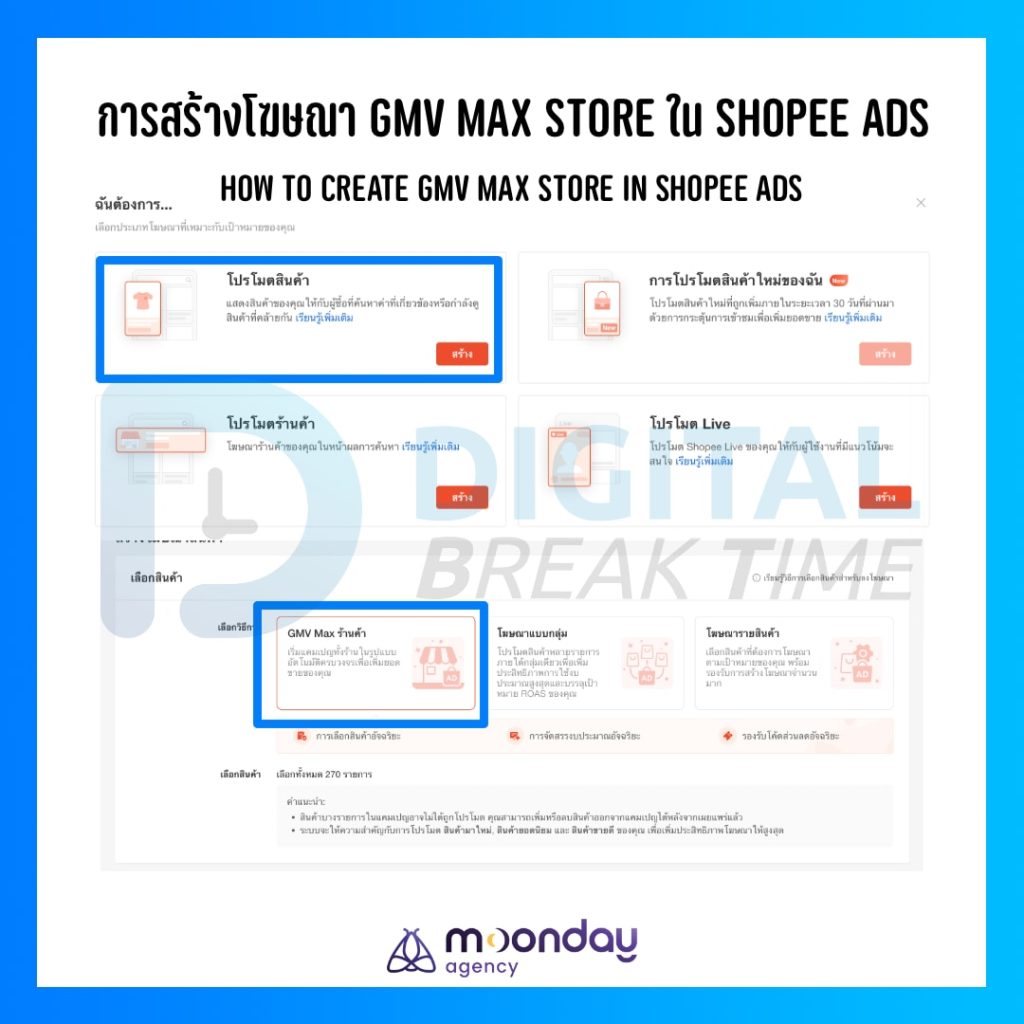
3. High Flexibility: Customize Advertised Products Anytime
Although the campaign initially selects your entire store by default, it offers great post-launch flexibility. You can easily add or remove specific items even while the campaign is actively running.
The process is very simple:
- Go to your active GMV Max Store campaign.
- Sort your products based on your needs (e.g., highest ad spend, lowest ROAS).
- Select the items you want to remove and click the “Delete” button on the left.
- To bring products back, use the “Add Products” menu on the right.
This freedom to optimize is crucial. If you notice a product is draining your budget with low GMV and poor ROAS, you can instantly cut it off, redirecting your ad money to more profitable items.
4. Limitations to Watch Out For
The first limitation is the minimum daily budget requirement of 200 THB. While large businesses won’t have an issue with this, small shops need to realize this commits you to at least 6,000 THB per month. If you are also running individual GMV Max Item campaigns simultaneously, you need to ensure you have a sufficient marketing budget allocated.
Secondly, the GMV Max Store campaign will not advertise products that are already active in your individual GMV Max Item campaigns. For example, if Product A already has its own specific ad campaign, the Store campaign will ignore it. There is no overlapping promotion; the system strictly focuses on pushing the unpromoted items in your catalog.
5. Who Should Use GMV Max Store Campaigns?
This feature is ideal for two main types of sellers:
- Sellers wanting full coverage on a consolidated budget: If you create individual campaigns for dozens of products, your monthly ad spend will skyrocket rapidly. The Store campaign lets you advertise your entire catalog for a flat minimum of 200 THB per day (6,000 THB/month), letting the system do the heavy lifting.
- Sellers looking to boost secondary products: If you have a massive inventory, manually setting up ads for every single small or niche item is exhausting. The GMV Max Store Shopee Ads campaign acts as an excellent “sweeper,” picking up those secondary, often-ignored items and giving them a genuine chance to generate sales.
Summary: Real-World Results of GMV Max Store Shopee Ads
Based on my continuous testing across three different e-commerce stores, I utilized the Custom ROAS setting. The actual results? The campaigns consistently delivered a ROAS that was 20-30% higher than my initial target (though results will naturally vary by store).
Because I set a high ROAS target from the start, the system naturally gravitated toward selling higher-ticket items. These were mostly secondary products that didn’t have their own individual campaigns, so it was fantastic to see them finally move and generate cash flow.
Diving deeper into the campaign analytics, I did notice some low-priced items failing to hit the target ROAS. However, the sales volume and ad spend for these were very low, so I left them running. As a marketer, I understand the numbers—low-ticket items inherently yield a lower ROAS compared to high-ticket ones. Overall, I plan to keep these campaigns running continuously while monitoring the data closely, just as any good optimizer should.
Follow Digital Break Time
Facebook, X, Line Official Account, Instagram, Spotify, YouTube, Apple Podcast
Originally in Thai. Translated to English with the help of Gemini.